This article is one step from our Master Help Guide: All About the CRM. We recommend starting with the visual walkthrough video and examples inside the Master Help Guide before diving into the technical breakdown below.
Each Master Help Guide acts as your project plan – teaching you the feature, laying out the steps in the right order, and linking to every resource you’ll need along the way.
This guide is perfect if you want to:
Enable/disable duplicate contacts
Merge duplicate contacts
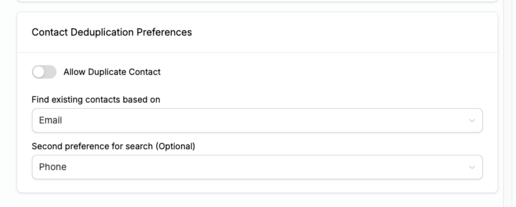
From the main Ivorey™ menu, go to Settings > Business and then under General you can edit settings to disable/enable duplicate contacts based on your preferences, as shown below:
To merge contacts, go to your Contact list, search for the name and select the checkbox next to each of the duplicate contacts that you want to merge. Then, select the [Merge] icon on the top of the contact screen (as shown below). Follow the prompts to choose which settings you want to carry over to the new master profile.


No, once contacts are merged, all of their associated data and conversation history become combined into a single contact record, and can’t be separated again. It’s not possible to retrieve the original conversation.
Hit the support chat widget inside Ivorey - we can:
Walk you through any of the steps
Troubleshoot anything that’s not working
We’re here and ready to help via the chat widget in the bottom right of your Ivorey™ account. Or if you are looking for done-for-you support, you can browse our current services here 🤍
